For millions of people, information exists in documents—PDFs, manuals, books—but accessing that information isn't easy. Most document-based AI tools assume users are comfortable typing, fluent in English, and can navigate dense text interfaces. This leaves out a huge audience, especially Urdu-speaking users who prefer voice interaction and audio responses. Urdu Voicebot was built to explore a different approach: what if documents could be spoken to—and answered back in Urdu?
Related service: AI & LLM Integration Services
The problem: assumptions exclude users
For millions of people, information exists in documents—PDFs, manuals, books—but accessing that information isn't easy. Most document-based AI tools assume users are comfortable typing, fluent in English, and can navigate dense text interfaces.
This leaves out a huge audience, especially Urdu-speaking users who prefer voice interaction and audio responses, or who want a more natural way to consume information. The challenge wasn't a lack of AI tools—it was that existing tools didn't account for different interaction preferences and languages.
- Most tools assume users are comfortable typing
- English-only interfaces exclude non-English speakers
- Dense text interfaces are difficult to navigate
- Urdu-speaking users lack native language support
- Voice interaction is rarely supported in document tools
- Audio responses are uncommon in AI document assistants
What if documents could be spoken to—and answered back in Urdu? That idea became this AI-powered Urdu Voicebot.
The vision: voice-first, language-inclusive
The goal was simple but powerful: enable users to upload any PDF and interact with it entirely through voice—asking questions in Urdu and receiving answers in both text and spoken Urdu audio.
This project focuses on accessibility, inclusivity, and ease of use, not just technical novelty. The experience should feel natural and conversational, not technical or intimidating.
What the application does: voice-powered document interaction
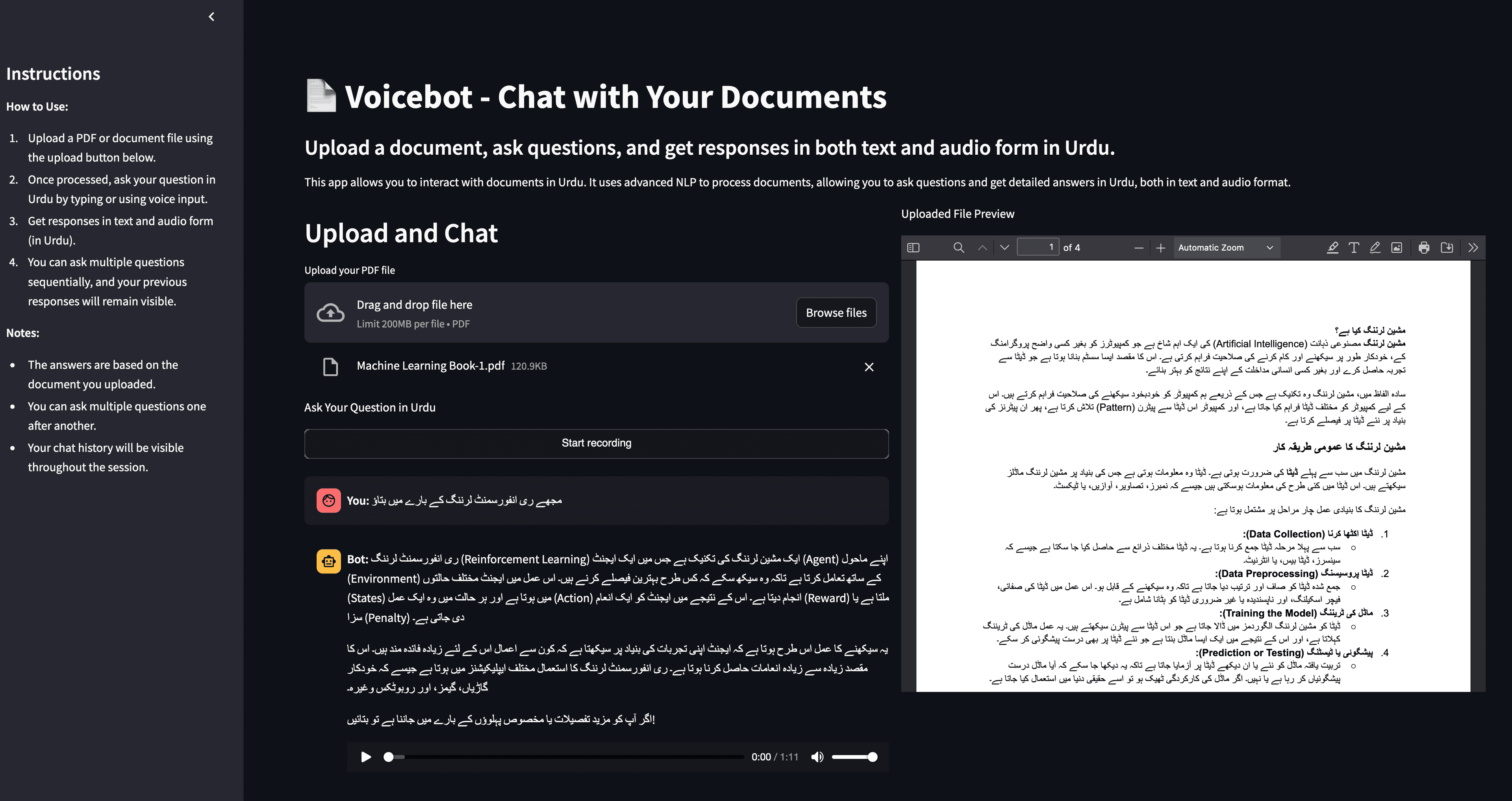
This application allows users to upload a PDF document, ask questions in Urdu using voice, receive context-aware answers based only on the uploaded document, get responses in Urdu text and Urdu audio (spoken output), ask multiple follow-up questions in the same session, and see chat history clearly throughout the interaction.
The experience is hands-free, conversational, and intuitive. Users don't need to type or read dense interfaces—they can speak and listen.
- Upload a PDF document
- Ask questions in Urdu using voice
- Receive context-aware answers based only on the uploaded document
- Get responses in Urdu text and Urdu audio (spoken output)
- Ask multiple follow-up questions in the same session
- See chat history clearly throughout the interaction
How it works: without technical jargon
Once a document is uploaded, the system reads and understands the content, and the meaning of the document is stored in a smart knowledge index. When a user speaks a question in Urdu, the system finds the most relevant parts of the document, the AI generates an answer based strictly on that content, the response is shown as text, and the same response is spoken back in Urdu.
The result feels less like 'searching a document' and more like talking to it. The interaction is natural, conversational, and accessible.
The result feels less like 'searching a document' and more like talking to it. The interaction is natural, conversational, and accessible.
Key features: explained simply
Urdu Voicebot brings together voice interaction, native language support, and document-based AI to create an accessible, inclusive experience.
- Voice-First Interaction: Users don't need to type. They can ask questions naturally using their voice, making the app accessible to a wider audience
- Urdu Language Support: Both input and output are fully in Urdu—including spoken audio responses—which is rarely supported in document-based AI tools
- Document-Bound Answers: The AI does not guess or pull information from the internet. Every answer is based strictly on the uploaded document, improving accuracy and trust
- Audio + Text Responses: Users can read the answer or listen to it—ideal for learning, accessibility, or hands-free use
- Clean & Simple Interface: Built with a minimal interface that focuses on uploading documents, asking questions, and viewing answers clearly. No clutter, no unnecessary controls
Accessibility and inclusivity first
This project focuses on accessibility, inclusivity, and ease of use. Voice interaction makes the app accessible to users who prefer speaking over typing, Urdu language support makes it accessible to Urdu-speaking users, and audio responses make it accessible to users who prefer listening or have visual impairments.
The goal was to make information accessible to more people, not just those who are comfortable with English text interfaces.
My role: building for real usability
I built this project end-to-end, including product concept and UX flow, document ingestion and processing, AI-powered question answering, vector storage and semantic search, Urdu text-to-speech output, voice-driven interaction design, and frontend implementation and deployment.
The focus was always on real usability, not just technical experimentation. Every feature was designed to make the experience more accessible and natural.
- Product concept and UX flow
- Document ingestion and processing
- AI-powered question answering
- Vector storage and semantic search
- Urdu text-to-speech output
- Voice-driven interaction design
- Frontend implementation and deployment
The impact: transforming documents into conversations
This voicebot transforms static documents into interactive, spoken knowledge. It can be used for education, research, manuals and guides, legal or policy documents, and accessibility-focused applications.
Users don't need to search—they can ask and listen. The experience is natural, accessible, and inclusive.
- Documents become interactive, spoken knowledge
- Voice interaction makes information accessible to more users
- Urdu language support includes Urdu-speaking audiences
- Audio responses support hands-free and accessibility use cases
- Natural conversation replaces complex search interfaces
- Information becomes accessible through speaking and listening
Final takeaway
This project demonstrates my approach to AI: AI should be inclusive, language should not be a barrier to knowledge, voice is often more natural than text, and powerful systems should feel simple to use. It's not just an AI demo—it's a step toward making information accessible to more people. This project turns documents into conversations. By combining AI, voice, and native language support, it shows how technology can adapt to people—instead of forcing people to adapt to technology.
Want a similar build?
If you're in a trade business and need software that matches your workflow end-to-end, let's talk.
Get In Touch