Many small and mid-sized businesses grow into chaos: leads live in spreadsheets, sales follow-ups are scattered in chats and emails, customer support issues get lost, invoices are created in separate tools, and managers have no clear overview of what's happening. Teams don't always need a complex enterprise tool on day one—but they do need a system that feels organized, scalable, and easy to use. The gap I aimed to solve was simple: build a CRM that gives a 360-degree view of customers, without feeling slow, cluttered, or overcomplicated.
Related service: AI & LLM Integration Services
View Demo
The problem: businesses growing into chaos
Many small and mid-sized businesses grow into chaos: leads live in spreadsheets, sales follow-ups are scattered in chats and emails, customer support issues get lost, invoices are created in separate tools, and managers have no clear overview of what's happening.
Teams don't always need a complex enterprise tool on day one—but they do need a system that feels organized, scalable, and easy to use. The gap I aimed to solve was simple: build a CRM that gives a 360-degree view of customers, without feeling slow, cluttered, or overcomplicated.
- Leads live in spreadsheets, disconnected from sales workflows
- Sales follow-ups scattered across chats and emails
- Customer support issues get lost or forgotten
- Invoices created in separate tools with no connection to customer history
- Managers have no clear overview of what's happening across the business
- Teams juggle multiple tools instead of one unified system
The gap I aimed to solve was simple: build a CRM that gives a 360-degree view of customers, without feeling slow, cluttered, or overcomplicated.
The solution: a unified operations hub
ClientPulse CRM was designed as a unified operations hub where a business can manage sales (leads, deals, pipeline), activities (calls, meetings, emails, notes), support (tickets, threads, resolution workflow), delivery (projects and milestones), billing (invoices, payments, contracts), reporting (KPIs and performance analytics), and administration (teams, roles, and permissions).
Everything is connected around a core entity: Companies, so teams can see the full relationship history at any time. This creates a true 360-degree view where every interaction, transaction, and touchpoint is visible in one place.
What the product includes: a complete CRM with 7 module groups
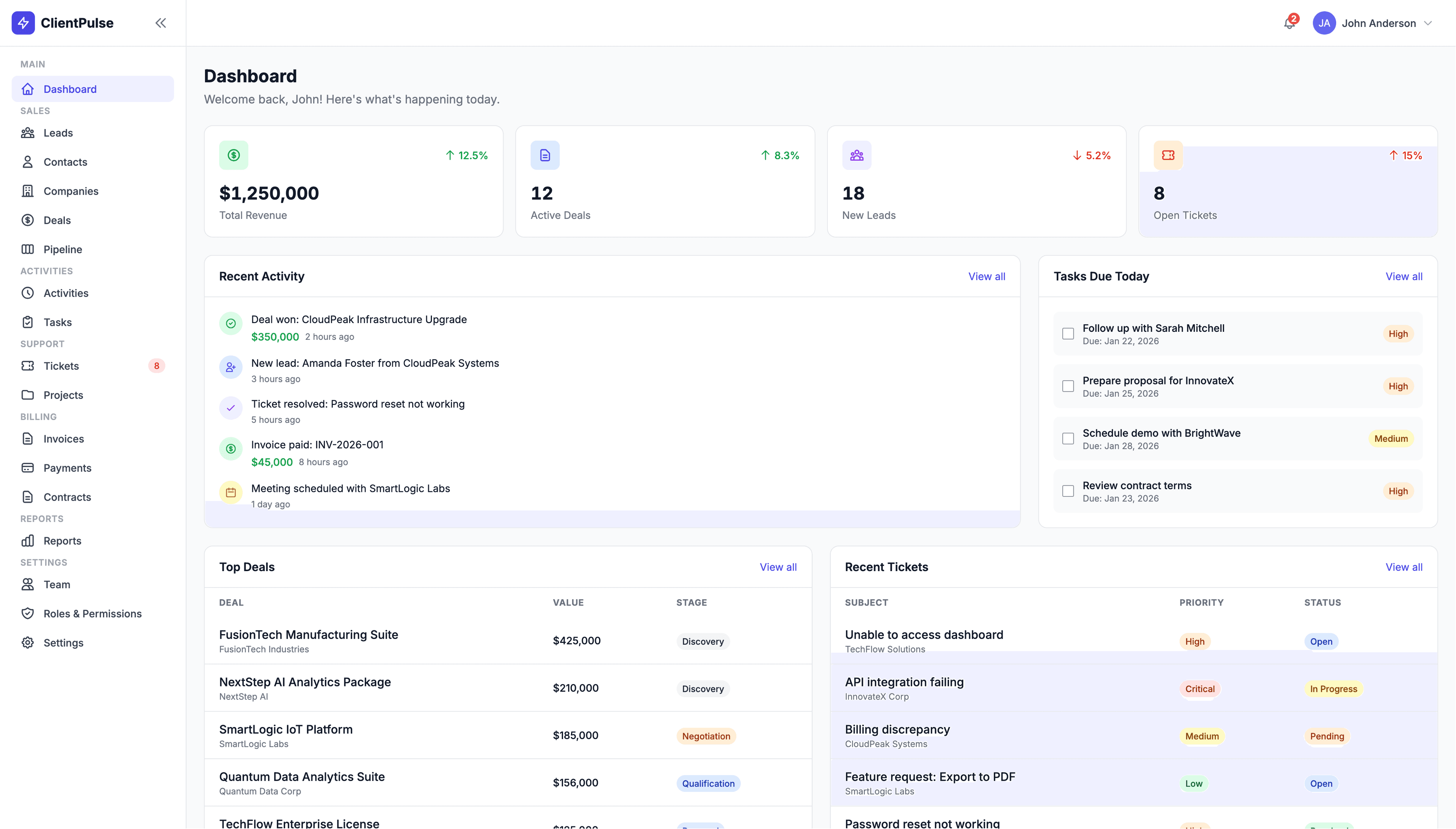
ClientPulse CRM is not a 'single-feature CRM.' It's a full business workflow system with 7 module groups containing 18 modules: Dashboard (KPIs + activity overview), Sales (Leads, Contacts, Companies, Deals, Pipeline), Activities & Tasks (daily execution tracking), Support (Tickets + Projects), Billing (Invoices, Payments, Contracts), Reports (Sales + Support analytics), and Settings (Team, Roles & Permissions, pipelines, notifications).
This comprehensive structure ensures that businesses can manage their entire customer lifecycle without switching between multiple tools or losing context.
- Dashboard: KPIs + activity overview
- Sales: Leads, Contacts, Companies, Deals, Pipeline
- Activities & Tasks: Daily execution tracking
- Support: Tickets + Projects
- Billing: Invoices, Payments, Contracts
- Reports: Sales + Support analytics
- Settings: Team, Roles & Permissions, pipelines, notifications
The story behind the build: product thinking, not just UI
I approached ClientPulse CRM like a real product build, not just a UI set. I started with a simple question: if a business owner opens the CRM every morning, what do they need to see immediately? That became the Dashboard with revenue and deal pipeline health, new leads and open tickets, tasks due today, and top deals and recent activity.
Then I built outward from there using real business flows: leads become contacts + deals, deals move through a pipeline to Closed Won/Lost, won deals create projects, contracts, invoices, support tickets link back to the same contacts and companies, and reports summarize everything for decision making. The goal was always clarity and speed.
Key features that stand out
ClientPulse CRM includes several key features designed for real business use: a sales pipeline built for real work with deals tracked by stage and probability, pipeline Kanban board with drag-and-drop interaction, stage totals and quick actions, and clean deal detail view with linked records.
Activity and task tracking provides accountability with logged calls, emails, meetings, and notes, outcomes like 'needs follow-up' or 'awaiting response,' tasks tied to contacts/deals/companies, and overdue tasks surfaced on the dashboard.
Support feels like a helpdesk with ticket lifecycle (Open → In Progress → Pending → Resolved → Closed), conversation thread experience, internal notes vs customer-facing messages, and priority, category, and assignment flow.
Billing and contracts are in the same system with invoices including line items and due dates, payments tied to invoices with references and methods, contracts module with e-signature support, and billing flow visibility inside the customer record.
Reporting makes sense with revenue trends, conversion rate and average deal size, support response/resolution metrics, and dashboards designed for managers, not developers.
- Sales Pipeline: Deals tracked by stage and probability, Kanban board with drag-and-drop, stage totals and quick actions
- Activity Tracking: Log calls, emails, meetings, notes with outcomes and follow-up tracking
- Support Helpdesk: Ticket lifecycle, conversation threads, internal notes, priority and assignment
- Billing & Contracts: Invoices with line items, payments tracking, contracts with e-signature support
- Reporting: Revenue trends, conversion metrics, support analytics, manager-focused dashboards
- Roles & Permissions: RBAC with Admins, Sales Managers, Sales Reps, Support Agents, Finance, Marketing, Viewer roles
Architecture and implementation: clean and backend-ready
ClientPulse CRM is built with HTML5 + Tailwind CSS for UI and Vanilla JavaScript with modular component architecture. It includes reusable UI components (sidebar, topbar, dropdowns, modals, tabs, toast notifications, tables) and a mock data layer designed for easy backend integration later.
This architecture is clean and practical for MVPs and enterprise internal tools because it keeps UI responsive and predictable, enforces consistency with reusable components, supports fast iteration before plugging in a real backend, and makes migration to API-driven architecture straightforward.
User flows: real business scenarios
The CRM is designed around real business flows. The sales flow: lead enters → rep qualifies → convert to contact + deal → move deal through pipeline → close won → trigger contract + invoice.
The support flow: ticket created → assigned → investigated with internal notes → resolved → closed after customer confirmation → metrics tracked.
The billing flow: invoice created → sent → paid → payment recorded → invoice status updated → overdue follow-up tasks if needed. These flows match how businesses actually operate, which makes the CRM feel natural.
My role: end-to-end product development
I designed and built ClientPulse CRM end-to-end: product structure and information architecture, UI system and reusable component framework, data relationships across the entire platform, module pages, detail views, tables, filters, forms, pipeline board experience and lifecycle logic, permissions model and admin settings structure, and workflow consistency across 45 pages.
This project demonstrates that I can build systems with product thinking (real workflows, not isolated screens), scalable structure (modules, RBAC, consistent components), enterprise presentation (clean UI, clear navigation, reporting), and expansion readiness (backend integration-friendly architecture).
Why this project matters: scalable CRM foundation
ClientPulse CRM demonstrates that I can build systems with product thinking (real workflows, not isolated screens), scalable structure (modules, RBAC, consistent components), enterprise presentation (clean UI, clear navigation, reporting), and expansion readiness (backend integration-friendly architecture).
It's the kind of CRM foundation that can be turned into an internal ops platform, an industry-specific CRM, or a full SaaS product with multi-tenant backend later. The architecture supports growth from MVP to enterprise scale.
Final takeaway
ClientPulse CRM represents the kind of system I build: complete, scalable, and ready for real business use. It's not just a UI template—it's a full CRM foundation that demonstrates product thinking, enterprise presentation, and expansion readiness. This project shows that I can build systems that businesses can actually use, not just admire.
Want a similar build?
If you're in a trade business and need software that matches your workflow end-to-end, let's talk.
Get In Touch