Content teams often struggle with the same issue: ideas live in spreadsheets, writing takes time, formatting is repetitive, publishing is manual, and tracking what's done is messy. Even with AI writing tools, someone still has to copy prompts, format content, paste it into documents, upload it to WordPress, and update tracking sheets. The real problem wasn't writing—it was the end-to-end workflow. That's what this automation solves.
Related service: AI & LLM Integration Services
The problem: content production is fragmented
Content teams face a recurring challenge: even with powerful AI writing tools, the process remains manual and fragmented. Ideas live in spreadsheets, writing takes time, formatting is repetitive, publishing requires manual steps, and tracking what's done becomes messy.
The real problem wasn't writing—it was the end-to-end workflow. Someone still has to copy prompts, format content, paste it into documents, upload it to WordPress, and update tracking sheets. This fragmentation slows down content production and creates opportunities for errors and missed steps.
- Ideas live in spreadsheets, disconnected from the production process
- Writing takes time, even with AI assistance
- Formatting is repetitive and error-prone
- Publishing is manual, requiring multiple steps
- Tracking what's done is messy and unreliable
- Even with AI tools, manual work remains in every step
The real problem wasn't writing—it was the end-to-end workflow. What if a blog post could move from an idea in Google Sheets to a published draft on WordPress—without human intervention?
The idea: automate the entire content pipeline
I designed this workflow to answer one simple question: What if a blog post could move from an idea in Google Sheets to a published draft on WordPress—without human intervention?
This n8n workflow turns a spreadsheet into a content production engine. It's not just about AI writing—it's about automating the entire pipeline from idea to published draft, removing every manual step along the way.
What this workflow does: end-to-end automation
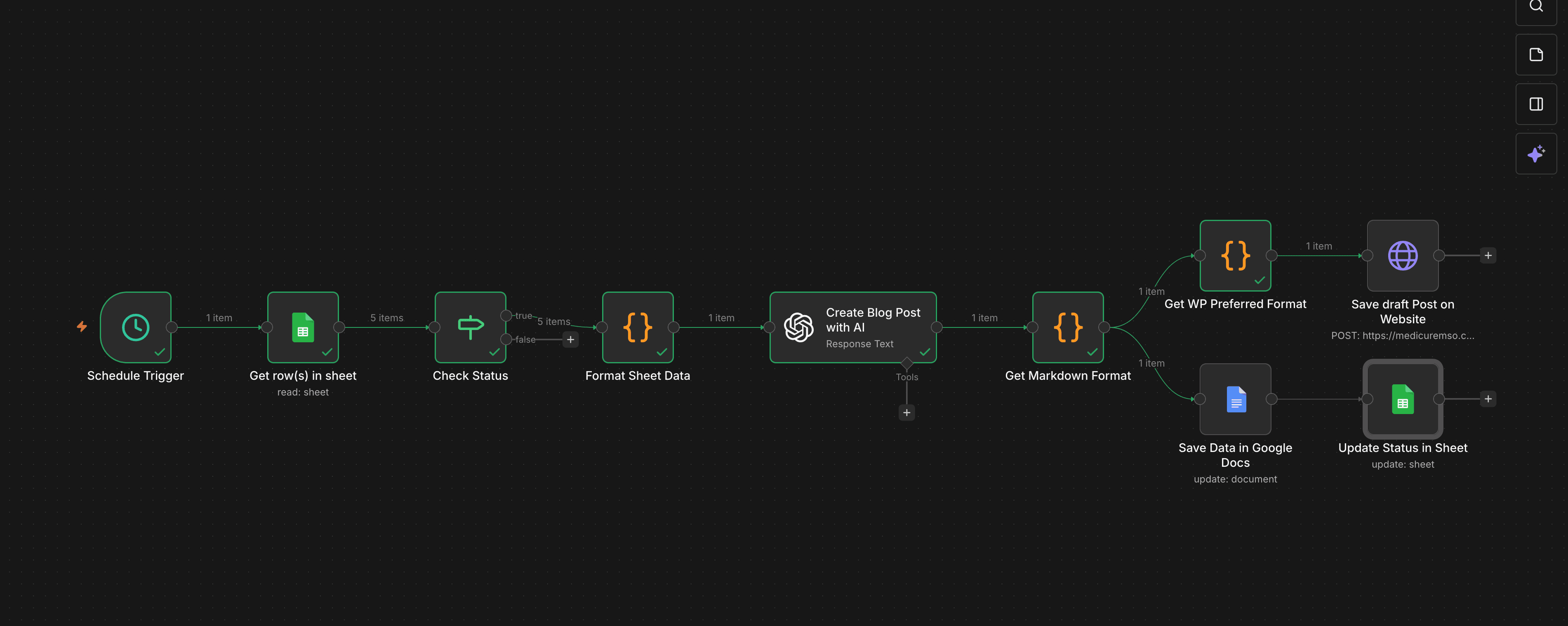
This automation takes blog topics from Google Sheets and automatically generates SEO-friendly blog content using AI, formats content into Markdown and WordPress-ready HTML, saves the content in Google Docs, publishes the post as a draft on a WordPress website, and updates the status back in Google Sheets—all on a schedule.
No copy-paste. No missed steps. No manual tracking. The workflow handles everything from content generation to publishing, ensuring consistency and reliability at every stage.
- Generates SEO-friendly blog content using AI
- Formats content into Markdown and WordPress-ready HTML
- Saves the content in Google Docs for review and archiving
- Publishes the post as a draft on a WordPress website
- Updates the status back in Google Sheets automatically
- Runs on a schedule without manual intervention
How the workflow works: step by step
The workflow operates as a production pipeline, moving content from idea to published draft through a series of automated steps. Each step is designed to remove manual work while maintaining quality and control.
- Scheduled Trigger: The workflow starts automatically on a defined schedule (daily/weekly), requiring no manual start
- Read Topics from Google Sheets: Fetches rows from a Google Sheet where each row represents a blog topic or keyword, with status indicating whether it's pending or already processed
- Status Check: Only rows marked as pending are processed, with completed topics skipped to avoid duplicates—making the workflow safe to run repeatedly
- Data Formatting: The topic, keywords, and metadata are cleaned and structured so the AI receives clear, consistent input, ensuring content quality and predictable results
- AI Content Generation: Using AI, the workflow generates a full blog post with structured headings, SEO-friendly flow, and human-readable language—not a one-liner prompt, but controlled content generation designed for publishing
- Markdown & WordPress Formatting: Content is converted into Markdown (for documents and backups) and WordPress-preferred HTML format, ensuring it looks correct across platforms
- Save to Google Docs: A formatted version is saved to Google Docs for review, editing, archiving, and collaboration, giving teams visibility and control
- Save Draft on WordPress: The same content is published automatically as a draft post on the WordPress website, allowing editors to review, tweak, and publish without starting from scratch
- Update Status in Google Sheets: Once complete, the workflow updates the row status to Done, closing the loop and keeping tracking accurate
Why this workflow is powerful: it's a production pipeline
This isn't just 'AI writing content.' It's a production pipeline that moves ideas through content generation, formatting, documentation, publishing, and tracking—fully automated, repeatable, scalable, and safe to re-run.
It turns Google Sheets into a control panel for content operations, enabling teams to manage dozens or hundreds of posts with minimal manual work.
- Fully automated: Ideas → Content → Docs → CMS → Tracking
- Repeatable: Safe to run multiple times without creating duplicates
- Scalable: Handles dozens or hundreds of posts with the same workflow
- Reliable: Error-safe execution logic prevents failures from breaking the process
- Controlled: Teams maintain visibility and can review before publishing
My role: end-to-end workflow design and implementation
I designed and built this workflow end-to-end, including workflow architecture, conditional logic to prevent duplicates, AI prompt structuring, content formatting pipelines, WordPress publishing integration, Google Docs and Sheets synchronization, and error-safe execution logic.
Every step was designed to remove manual work without removing control. The workflow handles edge cases, prevents duplicates, and ensures content quality while maintaining team oversight.
- Workflow architecture and system design
- Conditional logic to prevent duplicates and handle edge cases
- AI prompt structuring for consistent, high-quality content
- Content formatting pipelines for Markdown and WordPress HTML
- WordPress publishing integration via API
- Google Docs and Sheets synchronization
- Error-safe execution logic that prevents failures from breaking the process
The impact: faster, consistent, scalable content production
This workflow enables faster content production, consistent formatting, zero copy-paste work, reliable tracking, and easy scaling to dozens or hundreds of posts. It's especially valuable for SEO teams, content agencies, blog-heavy SaaS products, and solo founders managing content alone.
- Faster content production with automated generation and publishing
- Consistent formatting across all posts
- Zero copy-paste work, eliminating manual errors
- Reliable tracking that stays accurate automatically
- Easy scaling to dozens or hundreds of posts
- Valuable for SEO teams, content agencies, blog-heavy SaaS products, and solo founders
Why this project matters: automation that teams can trust
This project reflects how I approach automation: automate processes, not just tasks; combine AI with real systems; build workflows that teams can trust; and focus on long-term scalability. It's not just an n8n workflow—it's a content operations system.
Final takeaway
Anyone can generate AI text. This workflow proves something more valuable: I build systems where AI actually does useful work—automatically. By automating the entire content pipeline from idea to published draft, this workflow transforms Google Sheets into a control panel for content operations, enabling teams to produce more content with less manual work.
Want a similar build?
If you're in a trade business and need software that matches your workflow end-to-end, let's talk.
Get In Touch