Geotagging sounds simple until you actually try to do it. Most tools either require uploading photos to a server (privacy risk, especially for client work), hide geotagging behind complex desktop software, strip quality or break metadata, or don't give you a reliable way to verify the exact location visually. For agencies, local businesses, real estate teams, and photographers, this becomes a real pain: 'I just want to add GPS coordinates to this photo quickly, safely, and correctly.' GeoPin EXIF was built around one core principle: if the user's photos never leave their device, the tool is instantly more trustworthy.
View Demo
The problem: geotagging tools that compromise privacy or usability
Geotagging sounds simple until you actually try to do it. Most tools either require uploading photos to a server (privacy risk, especially for client work), hide geotagging behind complex desktop software, strip quality or break metadata, or don't give you a reliable way to verify the exact location visually.
For agencies, local businesses, real estate teams, and photographers, this becomes a real pain: 'I just want to add GPS coordinates to this photo quickly, safely, and correctly.' The existing tools either compromise privacy, require complex software, or don't provide reliable EXIF embedding.
- Most tools require uploading photos to a server (privacy risk, especially for client work)
- Complex desktop software that's hard to use
- Tools that strip quality or break metadata
- No reliable way to verify the exact location visually
- Lack of trust in server-based processing for sensitive images
The real challenge wasn't just adding GPS coordinates—it was doing it in a way that preserves privacy, maintains image quality, and provides a reliable, user-friendly experience.
The solution: true privacy by design with browser-based processing
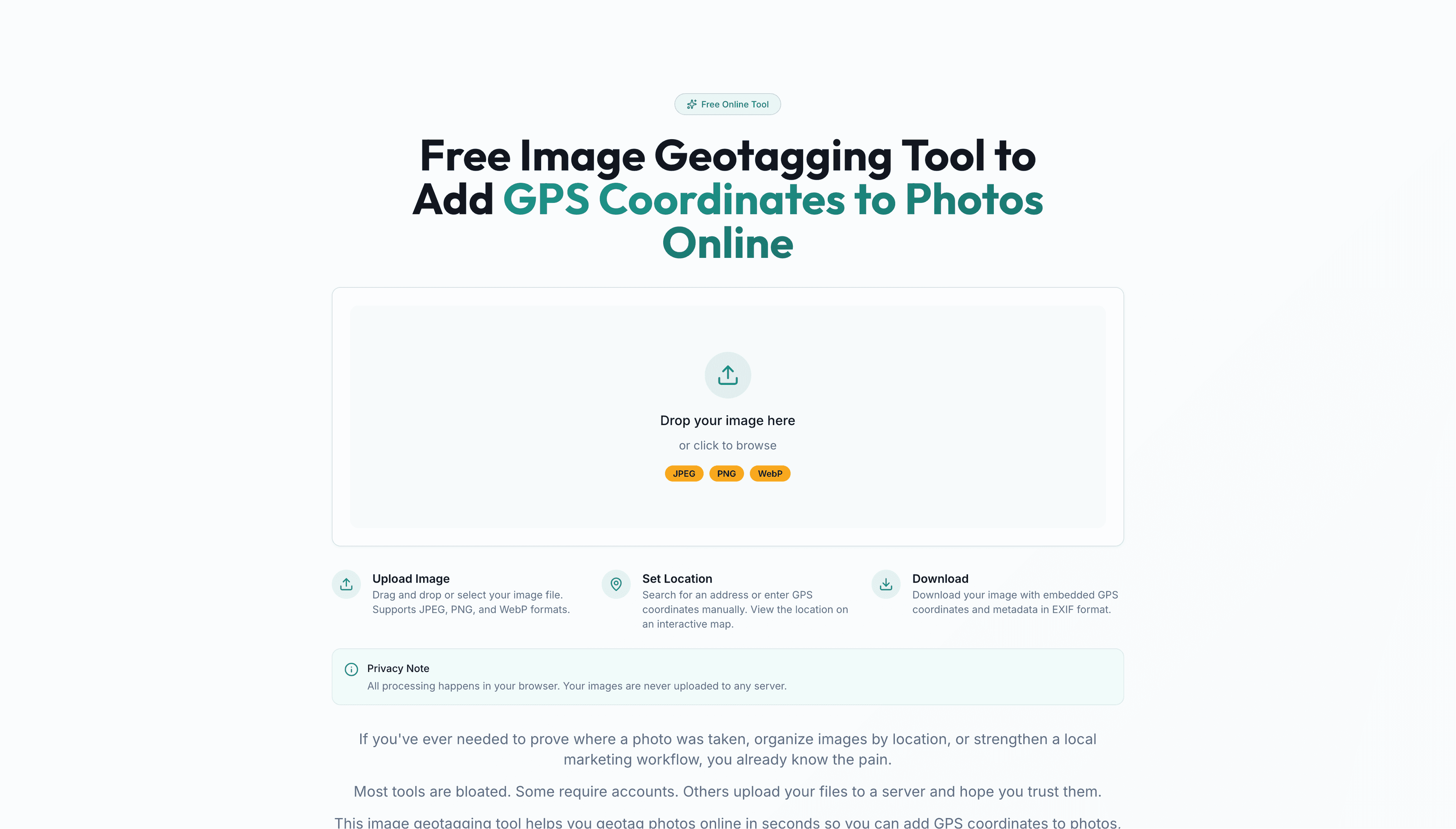
GeoPin EXIF was built around one core principle: if the user's photos never leave their device, the tool is instantly more trustworthy. So the tool runs entirely in the browser and offers a simple workflow: upload photo (drag & drop), choose location (search, map click, or manual coordinates), add optional metadata (title, author, camera info, rating, etc.), and download the updated photo with embedded GPS EXIF data.
No login, no server uploads, no tracking. Everything happens locally in the browser using client-side image processing, ensuring complete privacy and security.
What makes GeoPin EXIF stand out
GeoPin EXIF demonstrates several key differentiators that matter in real product work: true privacy by design with zero server uploads, reliable EXIF GPS embedding that handles decimal to degrees/minutes/seconds conversion, map-based location selection with search and visual confirmation, multi-format support with smart conversion to JPEG, and a clean UX that feels like a product.
- True Privacy by Design: Zero server uploads, no analytics or tracking, no account system, works instantly in any modern browser
- Reliable EXIF GPS Embedding: Handles decimal → degrees/minutes/seconds conversion, N/S + E/W references, safe embedding using piexifjs
- Map-Based Location Selection: Search by address (OpenStreetMap Nominatim), click on map to choose location, reverse geocode coordinates into readable address, visually confirm the pin before download
- Multi-Format Support with Smart Conversion: PNG and WebP converted to JPEG using Canvas API, quality preserved and only metadata changes, output is always a consistent, EXIF-safe file
- Clean UX That Feels Like a Product: Real-time preview (photo + pin), responsive design, toast notifications and smooth interactions, filename auto-generation based on title for better organization, dark mode support based on system preference
How it works: client-side image processing pipeline
GeoPin EXIF follows a simple client-side pipeline: Upload → Read → Extract → Edit → Embed → Download. The process reads images locally using FileReader, extracts existing EXIF (including GPS if it exists), allows user to select location via map or search, converts format if needed (PNG/WebP → JPEG via Canvas), sanitizes metadata strings to avoid EXIF corruption, embeds GPS + metadata using piexifjs, and converts to Blob and triggers download with a clean filename.
This keeps everything fast, private, and reliable. The entire process happens in the browser without any server interaction.
Who it's for: real-world use cases
GeoPin EXIF is designed for real-world use cases: local businesses geotagging photos for local SEO workflows, agencies processing client location images with privacy in mind, real estate and hospitality teams tagging property photos with exact coordinates, photographers organizing shoots and travel photos, and field work including inspections, site visits, reporting, and evidence documentation.
- Local businesses: geotag photos for local SEO workflows
- Agencies: process client location images with privacy in mind
- Real estate and hospitality: tag property photos with exact coordinates
- Photographers: organize shoots, travel photos, documentation sets
- Field work: inspections, site visits, reporting, evidence documentation
Technical foundation: modern web stack with privacy-first architecture
GeoPin EXIF is built with Next.js 16 (App Router), React 19, TypeScript, Tailwind CSS + shadcn/ui, and Framer Motion for animations. Image processing uses piexifjs for reading/writing EXIF in JPEG and Canvas API for format conversion and export. Maps and geocoding are handled by Leaflet + React Leaflet and OpenStreetMap Nominatim API for address search and reverse geocoding. Data fetching uses TanStack Query (React Query) for geocoding calls and caching.
Every component was chosen to enable true client-side processing while maintaining a modern, responsive user experience.
My role: end-to-end product development
I built GeoPin EXIF end-to-end: product concept and UX flow, EXIF extraction + GPS embedding logic, coordinate format conversions and data sanitization, map selection + search + reverse geocoding, multi-format handling and reliable JPEG export, and responsive UI with user-friendly feedback states.
This project demonstrates two things that matter in real product work: trust-first engineering where privacy is enforced by architecture, and solving real edge cases like EXIF writing, GPS formatting, format conversion, string sanitization, and platform behavior differences.
Why this project matters: trust-first engineering and edge case handling
GeoPin EXIF demonstrates two things that matter in real product work: trust-first engineering where privacy isn't a marketing line but enforced by architecture, and solving real edge cases that most tools struggle with—EXIF writing, GPS formatting, format conversion, string sanitization, and platform behavior differences.
This project shows that I can build tools that handle complex technical challenges while maintaining a focus on user trust and privacy. It's not just about adding features—it's about building the right architecture from the start.
Final takeaway
GeoPin EXIF represents the kind of tool I build: privacy-first, technically sound, and user-focused. It's not just a geotagging tool—it's a demonstration of trust-first engineering and careful attention to edge cases that matter in real-world use. This project shows that I can build tools that users can trust with their sensitive files, while handling complex technical challenges like EXIF manipulation and format conversion correctly.
Want a similar build?
If you're in a trade business and need software that matches your workflow end-to-end, let's talk.
Get In Touch